Friday, September 25, 2009

Nortel Business Secure Router 222 and CISCO ASA 5500 Series VPN Connection

Symptom:

You would like to connect Nortel Small Business Router 222 to CISCO ASA 5505 or 5510 type device. You were probably not successful for a while (at least for me).

What Worked For Me:
  • The major issue for me was to find what types of SA negotiation parameters to choose for the Phase 1. Pretty much this works only with 3DES-SHA1 combo for me. I tried others and won't work.
  • Phase 2 appears to have not much problem whatever you choose.
  • Also it seems that if you set the IKE->Policies : key lifetime to 86400 on the Nortel side they do not like.
Nortel Side:
  • Go to the VPN menu on the left
  • Edit or Create a new VPN Entry
  • Connection Type: Branch Office
  • Check Active
  • NAT Transversal enabled
  • Key management: IKE
  • Negotiation Mode: mAIN
  • Encapsulation Mode: Tunnel
  • Authentication: Pre-Shared Key
  • Local ID Type: IP
  • Content: The Outside IP address of the Nortel
  • Peer ID Type: IP
  • Content: The Peer VPN Access point address of CISCO ASA
  • My IP Address: The Outside IP address of the Nortel
  • Secure Gatway Address: The Peer VPN Access point address of CISCO ASA
  • ESP (Selected)
  • Go to Advanced Menu
  • Enable Replay Detection: Yes
  • Phase 1
  • Multiple Proposal: Not Checked
  • Negotiation Mode: Main
  • Encryption Algorithm: 3DES (most important, do not choose anything else)
  • Authentication Algorithm: SHA1 (most important, do not choose anything else)
  • SA Life Time (seconeds): 24000 (do not choose 86400)
  • Key Group DH1 (but make sure that IKE Policies on the CISCO end has this combo)
  • Phase 2
  • Multiple Proposal: Not Checked
  • Active Protocol: ESP
  • Encryption Algorithm: ASE 256 (but can be 3DES)
  • Authentication Algorithm: SHA1
  • SA Life Time (Seconds): 24000 (do not use 86400)
  • Encapsulation: Tunnel
  • Perfect Forwarding Security: None (very important)
On the CISCO Side (ASDM)
  • Go to Configuration
  • Open IKE->Policies node and be sure that 3des-sha DH group 1 pre-share authentication is in there. Lifetime(secs) can be left to 86400
  • Now use the VPN Wizard to complete the rest.

Sunday, September 20, 2009

Snow Leopard Break Fix List

Symptom:

After upgrading Snow Leopard I have started to experience many things that were broken. This lists the issues and fixes if I learn about them.

The List:
  • Development environment (gcc, make etc): Requires a re-installation of Xcode that came with the Leopard CD.
  • /usr/include/stdarg.h:4:25 Error when building something: Apprently needs OS 10.4 SDK installed and many stuff have to use gcc-4.0 to build. While updating Xcode, be sure to add that optional 10.4! Once you do that do
export CC=/usr/bin/gcc-4.0

In addition removing -arch pcc from the build line and leaving only -arch i386 may get your to build what you want.
  • macports: Get the Snow Leopard version from MacPorts web site.
  • HP Printer Driver: See my previous post. If you HAD an HP printer then you may need to completely clean the driver software from your Mac.
  • CISCO VPN Client 4.9.01: Re-installing will reactive the program.

Saturday, September 19, 2009

Snow Leopard and HP LaserJet 3020 Print Pauses After Upgrade

Symptom:

After upgrading to Snow Leopard we were unable to print any longer using our HP LaserJet 3020 (All in One). The Event Log in the Printer Queue said:

/usr/libexec/cups/backend/usb failed"

When we opened the Terminal and type in a command

/usr/libexec/cups/backend/usb

We saw the following error message:

"Unable to load class driver "/Library/Printers/hp/hpio/HPIOPrinterClassDriver.plugin": No such file or directory"

We Tried To Fix with the Following But Nothing Worked:
  • Got the latest 6.0.1 Driver for HP is at http://support.apple.com/downloads/#macosx106
  • Check: http://localhost:631/ which is the local CUPS driver admin page.
Solution:

First, from the System Preferences (i.e., control panel) "Printers and Faxes" remove the malfunctioning printer queue for the LaserJet.

Next, Completely Cleanup Driver by doing the following. Please note that this requires a system administration privilege and so I am not going to explain how that is done. If you do not know how to do a "sudo" then you should not do this. Please ask for an assistance from any Unix or Mac OS X knowledgeable person. I suggest that you use Time Machine to get at least one backup of current operating environment.

rm -rf /Library/Application Support/hp folder
rm -
rf /Library/Frameworks/HPDeviceModel.framework
rm -
rf /Library/Frameworks/HPPml.framework
rm -
rf /Library/Frameworks/HPServicesInterface.framework
rm -
rf /Library/Frameworks/HPSmartPrint.framework
rm -
rf /Library/LaunchAgents/com.hp.launchurlagent.plist
rm -
rf /Library/Printers/hp folder
rm -
rf /Library/Printers/PPDs/Contents/Resources/hp*.gz
rm -
rf /System/Library/Extensions/
hp_io_printerclassdriver_enabler.kext

This have completely cleaned up all the HP printer data.

Reboot the system.

Go back to the Printer and Faxes control panel and this time the System will load the latest printer driver from the Internet after you add the printer queue for the Laser Jet, and you should be all set to go.


Friday, September 18, 2009

ERROR: Cannot use the special principal 'sa'. Microsoft SQL Server, Error: 15405

As of May 2012 This is The Most Popular Post For People To Come To This Blog.
People must be having this issue all over the world!
Symptom:

You tried to create or alter a table column (or likewise attributes in a table) with Microsoft SQL Server Management Studio and get the following error.

ERROR: Cannot use the special principal 'sa'. Microsoft SQL Server, Error: 15405

You can get into the SQL server with 'sa' in Mixed Mode authentication. You have even given the sa permissions to all of the databases.

Root Cause:

The database ownership is still not correct when you restored or re-attached database. This happens for example, if you restore a database using an integrated authentication account.


Try This Fix:

Open the SQL Query windows in the Microsoft SQL Server Management Studio, and try something that resemble below by changing. TheNameOfYourDatabase to the database you are using. Do this with every database that you have that you need the 'sa' access. This will change the owner of the database to the account you designate.

use TheNameOfYourDatabase
exec sp_changedbowner 'sa', 'true'

Wednesday, August 19, 2009

System.Data.ConstraintException: Failed to enable constraints. One or more rows contain values violating non-null, unique, or foreign-key constraints.

I occasionally have a problem when trying to use TableAdapter

System.Data.ConstraintException: Failed to enable constraints. One or more rows contain values violating non-null, unique, or foreign-key constraints.

In my case this happened because we did not include any of the primary keys in table joins.

My Solution:

You may want to try this using your DataSet Designer.
  1. Open the dataset designer
  2. Go to the TableAdapter in question
  3. Find where the primary key is set
  4. Right click over and select Primary Key menu
  5. Change the key to something else that make more sense

Sunday, July 19, 2009

Simple Way to Encrpt and Decrypt Short Text in Python

Some Basic Way of Encrypting and Decrypting Text in Python

I was looking for some basic code in Python to encrypt and decrypt short text, for example, to store SQL passwords and such in configuration file or embed them within in scripts. So far I have not found a Python native way of doing this easily (most likely I am missing something and you ought to let me know). Also there are also some commercial libraries like CHILCAT that can do this using asymmetric stuff like AES and such, but I just want to hid obvious from plain public view (i.e., the local IT security people who'd scan all directories for passwords for holes) to prevent some robotic file scanners to collect such info.

I found the following code on the internet, but when I ran it under Python 2.6.2 it gave me a lot of errors, mainly due to the SHA library deprecated and moved into haslib. I made the corrections so here it is.

# Author: Paul Rubin, Fort GNOX Cryptography, .
# Algorithmic advice from David Wagner, Richard Parker, Bryan
# Olson, and Paul Crowley on sci.crypt is gratefully acknowledged.

# Copyright 2002,2003 by Paul Rubin
# Copying license: same as Python 2.3 license
# Modified 19 July 2009 by Manabu Tokunaga for Python 2.6.2

# Please include this revision number in any bug reports: $Revision: 1.2 $.

from string import join
from array import array
#import sha
import hashlib
from time import time

class CryptError(Exception): pass
def _hash(str): return hashlib.sha224(str).digest()

_ivlen = 16
_maclen = 8
_state = _hash(`time()`)
# Author: Paul Rubin, Fort GNOX Cryptography, .
# Algorithmic advice from David Wagner, Richard Parker, Bryan
# Olson, and Paul Crowley on sci.crypt is gratefully acknowledged.

# Copyright 2002,2003 by Paul Rubin
# Copying license: same as Python 2.3 license
# Modified 19 July 2009 by Manabu Tokunaga for Python 2.6.2

# Please include this revision number in any bug reports: $Revision: 1.2 $.

from string import join
from array import array
#import sha
import hashlib
from time import time

class CryptError(Exception): pass
def _hash(str): return hashlib.sha224(str).digest()

_ivlen = 16
_maclen = 8
_state = _hash(`time()`)

try:
import os
_pid = `os.getpid()`
except ImportError, AttributeError:
_pid = ''

def _expand_key(key, clen):
blocks = (clen+19)/20
xkey=[]
seed=key
for i in xrange(blocks):
seed=hashlib.sha224(key+seed).digest()
xkey.append(seed)
j = join(xkey,'')
return array ('L', j)

def p3_encrypt(plain,key):
global _state
H = _hash

# change _state BEFORE using it to compute nonce, in case there's
# a thread switch between computing the nonce and folding it into
# the state. This way if two threads compute a nonce from the
# same data, they won't both get the same nonce. (There's still
# a small danger of a duplicate nonce--see below).
_state = 'X'+_state

# Attempt to make nlist unique for each call, so we can get a
# unique nonce. It might be good to include a process ID or
# something, but I don't know if that's portable between OS's.
# Since is based partly on both the key and plaintext, in the
# worst case (encrypting the same plaintext with the same key in
# two separate Python instances at the same time), you might get
# identical ciphertexts for the identical plaintexts, which would
# be a security failure in some applications. Be careful.
nlist = [`time()`, _pid, _state, `len(plain)`,plain, key]
nonce = H(join(nlist,','))[:_ivlen]
_state = H('update2'+_state+nonce)
k_enc, k_auth = H('enc'+key+nonce), H('auth'+key+nonce)
n=len(plain) # cipher size not counting IV

stream = array('L', plain+'0000'[n&3:]) # pad to fill 32-bit words
xkey = _expand_key(k_enc, n+4)
for i in xrange(len(stream)):
stream[i] = stream[i] ^ xkey[i]
ct = nonce + stream.tostring()[:n]
auth = _hmac(ct, k_auth)
return ct + auth[:_maclen]

def p3_decrypt(cipher,key):
H = _hash
n=len(cipher)-_ivlen-_maclen # length of ciphertext
if n < 0:
raise CryptError, "invalid ciphertext"
nonce,stream,auth = \
cipher[:_ivlen], cipher[_ivlen:-_maclen]+'0000'[n&3:],cipher[-_maclen:]
k_enc, k_auth = H('enc'+key+nonce), H('auth'+key+nonce)
vauth = _hmac (cipher[:-_maclen], k_auth)[:_maclen]
if auth != vauth:
raise CryptError, "invalid key or ciphertext"

stream = array('L', stream)
xkey = _expand_key (k_enc, n+4)
for i in xrange (len(stream)):
stream[i] = stream[i] ^ xkey[i]
plain = stream.tostring()[:n]
return plain

# RFC 2104 HMAC message authentication code
# This implementation is faster than Python 2.2's hmac.py, and also works in
# old Python versions (at least as old as 1.5.2).
from string import translate
def _hmac_setup():
global _ipad, _opad, _itrans, _otrans
_itrans = array('B',[0]*256)
_otrans = array('B',[0]*256)
for i in xrange(256):
_itrans[i] = i ^ 0x36
_otrans[i] = i ^ 0x5c
_itrans = _itrans.tostring()
_otrans = _otrans.tostring()

_ipad = '\x36'*64
_opad = '\x5c'*64

def _hmac(msg, key):
if len(key)>64:
key=sha.new(key).digest()
ki = (translate(key,_itrans)+_ipad)[:64] # inner
ko = (translate(key,_otrans)+_opad)[:64] # outer
return hashlib.sha224(ko+hashlib.sha224(ki+msg).digest()).digest()

#
# benchmark and unit test
#

def _time_p3(n=1000,len=20):
plain="a"*len
t=time()
for i in xrange(n):
p3_encrypt(plain,"abcdefgh")
dt=time()-t
print "plain p3:", n,len,dt,"sec =",n*len/dt,"bytes/sec"

def _speed():
_time_p3(len=5)
_time_p3()
_time_p3(len=200)
_time_p3(len=2000,n=100)

def _test():
e=p3_encrypt
d=p3_decrypt

plain="test plaintext"
key = "test key"
c1 = e(plain,key)
c2 = e(plain,key)
assert c1!=c2
assert d(c2,key)==plain
assert d(c1,key)==plain
c3 = c2[:20]+chr(1+ord(c2[20]))+c2[21:] # change one ciphertext character

try:
print d(c3,key) # should throw exception
print "auth verification failure"
except CryptError:
pass

try:
print d(c2,'wrong key') # should throw exception
print "test failure"
except CryptError:
pass

_hmac_setup()
_test()
#_speed() # uncomment to run speed test

try:
import os
_pid = `os.getpid()`
except ImportError, AttributeError:
_pid = ''

def _expand_key(key, clen):
blocks = (clen+19)/20
xkey=[]
seed=key
for i in xrange(blocks):
seed=hashlib.sha224(key+seed).digest()
xkey.append(seed)
j = join(xkey,'')
return array ('L', j)

def p3_encrypt(plain,key):
global _state
H = _hash

# change _state BEFORE using it to compute nonce, in case there's
# a thread switch between computing the nonce and folding it into
# the state. This way if two threads compute a nonce from the
# same data, they won't both get the same nonce. (There's still
# a small danger of a duplicate nonce--see below).
_state = 'X'+_state

# Attempt to make nlist unique for each call, so we can get a
# unique nonce. It might be good to include a process ID or
# something, but I don't know if that's portable between OS's.
# Since is based partly on both the key and plaintext, in the
# worst case (encrypting the same plaintext with the same key in
# two separate Python instances at the same time), you might get
# identical ciphertexts for the identical plaintexts, which would
# be a security failure in some applications. Be careful.
nlist = [`time()`, _pid, _state, `len(plain)`,plain, key]
nonce = H(join(nlist,','))[:_ivlen]
_state = H('update2'+_state+nonce)
k_enc, k_auth = H('enc'+key+nonce), H('auth'+key+nonce)
n=len(plain) # cipher size not counting IV

stream = array('L', plain+'0000'[n&3:]) # pad to fill 32-bit words
xkey = _expand_key(k_enc, n+4)
for i in xrange(len(stream)):
stream[i] = stream[i] ^ xkey[i]
ct = nonce + stream.tostring()[:n]
auth = _hmac(ct, k_auth)
return ct + auth[:_maclen]

def p3_decrypt(cipher,key):
H = _hash
n=len(cipher)-_ivlen-_maclen # length of ciphertext
if n < 0:
raise CryptError, "invalid ciphertext"
nonce,stream,auth = \
cipher[:_ivlen], cipher[_ivlen:-_maclen]+'0000'[n&3:],cipher[-_maclen:]
k_enc, k_auth = H('enc'+key+nonce), H('auth'+key+nonce)
vauth = _hmac (cipher[:-_maclen], k_auth)[:_maclen]
if auth != vauth:
raise CryptError, "invalid key or ciphertext"

stream = array('L', stream)
xkey = _expand_key (k_enc, n+4)
for i in xrange (len(stream)):
stream[i] = stream[i] ^ xkey[i]
plain = stream.tostring()[:n]
return plain

# RFC 2104 HMAC message authentication code
# This implementation is faster than Python 2.2's hmac.py, and also works in
# old Python versions (at least as old as 1.5.2).
from string import translate
def _hmac_setup():
global _ipad, _opad, _itrans, _otrans
_itrans = array('B',[0]*256)
_otrans = array('B',[0]*256)
for i in xrange(256):
_itrans[i] = i ^ 0x36
_otrans[i] = i ^ 0x5c
_itrans = _itrans.tostring()
_otrans = _otrans.tostring()

_ipad = '\x36'*64
_opad = '\x5c'*64

def _hmac(msg, key):
if len(key)>64:
key=sha.new(key).digest()
ki = (translate(key,_itrans)+_ipad)[:64] # inner
ko = (translate(key,_otrans)+_opad)[:64] # outer
return hashlib.sha224(ko+hashlib.sha224(ki+msg).digest()).digest()

#
# benchmark and unit test
#

def _time_p3(n=1000,len=20):
plain="a"*len
t=time()
for i in xrange(n):
p3_encrypt(plain,"abcdefgh")
dt=time()-t
print "plain p3:", n,len,dt,"sec =",n*len/dt,"bytes/sec"

def _speed():
_time_p3(len=5)
_time_p3()
_time_p3(len=200)
_time_p3(len=2000,n=100)

def _test():
e=p3_encrypt
d=p3_decrypt

plain="test plaintext"
key = "test key"
c1 = e(plain,key)
c2 = e(plain,key)
assert c1!=c2
assert d(c2,key)==plain
assert d(c1,key)==plain
c3 = c2[:20]+chr(1+ord(c2[20]))+c2[21:] # change one ciphertext character

try:
print d(c3,key) # should throw exception
print "auth verification failure"
except CryptError:
pass

try:
print d(c2,'wrong key') # should throw exception
print "test failure"
except CryptError:
pass

_hmac_setup()
_test()
#_speed() # uncomment to run speed test

Thursday, July 02, 2009

Ruby on Rails: "no such file to load sqlite3" when preforming "rake db:create"

Symptom:

You were trying to run the Ruby tutorial and when you do

rake db:create
You get the following error:

rake db:create
(in /Users/StokeMaster/rails/myapp)
rake aborted!
no such file to load -- sqlite3

Fix:

Try this command

sudo gem install sqlite3-ruby


Thursday, June 25, 2009

Visual Studio 2005 & 2008: fatal error LNK1104: cannot open file 'LIBC.lib'

Symptom:

You tried to re-build an old Visual Studio 6.0 C or C++ project in Visual Studio 2005 or 2008 and you get the following error:

Fatal error LNK1104: cannot open file 'LIBC.lib'

Root Cause:

LIBC.LIB is no longer supported in the later version of Microsoft Visual Studio product.

Possible Fix:

Use the Multi-Thread-Safe version LIBCMT.LIB instead of LIBC.LIB that may fix.

  • Go to the Project property page.
  • Go to Linker on the left tree view panel
  • Open the Input node
  • In the "Additional Dependencies" you will find LIBC.lib, replace that with LIBMT.lib
Rebuild your project.

Saturday, June 20, 2009

Mac OS Canon MP Series WiFi Printer Scanner Does Not Scan But Can Print

Symptom:

I have a Canon MP620 WiFi printer and I can print to it but I cannot scan, even though the Canon IJ Network Scan Utility can locate the printer/scanner, and my computer is on the display of the printer itself.

Cause:

In my specific case, if I am connected to a company VPN (CISCO VPN Client), scanner cannot initiate a communication.

Fix:

Try turning off the VPN connection.


Friday, May 29, 2009

Yedda C# Twitter Update Results in 417 Expectation failed error

Symptom:

You are trying to call UpdateAsXML or UpdateAsJSON functions in the Yedda C# Twitter wrapper but when you try that the following response is sent back.

Error: 417 “Expectation Failed.” 


Fix:

Find ExcecutePostCommand() function in the Yedda C# Twitter class. Add the part in red as below.

protected string ExecutePostCommand(string url, string userName, string password, string data) {
WebRequest request = WebRequest.Create(url);
        System.Net.ServicePointManager.Expect100Continue = false;


Machine Behind Firewall Gets: Failed auto update retrieval of third-party root list sequence number

Symptom:

You have a well protected system behind a firewall that won't even get out to the Internet and you get following type of error:

Event Type: Error

Event Source: crypt32

Event Category: None

Event ID: 8


Description:

Failed auto update retrieval of third-party root list sequence number from: with error: This network connection does not exist.


Possible Fix:


Appears that it is lacking the Intermediate CA Certification.

Add a cert manually  from: http://www.verisign.com/support/verisign-intermediate-ca/secure-site-pro-intermediate/index.html


Wednesday, May 27, 2009

Simple Regular Expressions Simple Wild Card Search

Symptom:

The surf condition is great in Santa Cruz, you really want go get out of the office so you don't really want to geek out with Regular Expression experiements when all you want to do is a search equivalent of (*foo*.doc) in a DOS or Shell or SQL Like search... just about anywhere you've been to... but now your search box is demaning that you type in a regular expression to give you the search results.

Typing in *foo*.doc does not give you a jack! WTF!

You are not only flabbagasted with so many people who just want to show off their admiration to the beaufy of Regular Expression and don't give you this simple most common use of regex!

Fix:

Try this:

.*foo.*doc

Just remember that when you could normally use a * in a DOS file search use the ".*" combo instead of just a * (. means almost any character and * means repeat as many of them that before the *). This will search files that are xfoo.doc and xfoodoc in your list.

By the way if you really really want to do *foo*.doc (escape) the extension period with a \ So to do a DOS/Shell search equivalent of *.doc you would do .*\.doc For me the above method is just adequate. But if you get the taste of .*\.doc then you are starting to tread to the zone of a regex geek. I'd just find the string, get done with it and rather go surfing myself!

Now you may say, what about the ? mark you used to be able to use to look for a single character match. You already know this. Use a period.

For example, a regular expression search of "f..k" will find "fink" as well as "folk", and "fork" among other things (I know what you are thinking.)

If that does not work then you have other esoteric regex stuff in the string you are searching, like a " or a ? or a \ or { and such which have specific function in the expression. In that case, sorry, go RTFM! I am sorry!


Have fun!.

Tuesday, May 19, 2009

NET Remoting Error: Cannot create channel sink to connect to URL

Symptom:

You try to call an Activator.GetObject() to call a remote object.

Cannot create channel sink to connect to URL 'tcp:testhostname:1234/RemoteFileManager.soap'. An appropriate channel has probably not been registered. at System.Runtime.Remoting.RemotingServices.Unmarshal(Type classToProxy, String url, Object data) at System.Activator.GetObject(Type type, String url, Object state)

One Possible Cause:

Before going further and check the initializer and other stuff, double check the URL. In my case I forgot double slash after tcp:// and that caused above exception to happen.

Sunday, May 17, 2009

IDLE Autocomplete Does Not Work

Symptom:

You started to edit a Python program and Autocompletion does not work. You may have also noticed that it worked at one point or another.

Solution:

This is actually clearly stated in the Help document of the IDLE environment.

Just execute a program in IDLE (if you can). And it will load the symbols and after that automatic completion will work.

Note:

I looked for this quite a while on Google search but there was no clear explanation on this issue. I thought that some process goes to sleep or binding gets disabled.

On my Mac OS with Python 2.6, this happens every time I start IDLE up.

Monday, May 11, 2009

Visual Studio Remote Debugging Tips MS VS 2005

We have numerous situations at work where we need to debug issues at customer sites remotely. It is a huge hassle to install a development environment and source code and even source code control system at customer sites each time there is some hard-to-track crash or bug that we need to attend to.

Fortunately modern Visual Studio environment supports remote debugging. With the ubiquitous availability of VPNs this has became easier but there are still some challenges exist. I am sure that you have also been puzzled by why your system won't connect with the remote to begin a debug session, or get all sorts of different messages which all boil down to some connectivity and authentication issues.

I just got this to work (finally) with one of our customers using Visual Studio 2005 debugging environment. Both my system and the customer system was in different domains, so before I forget what hoops I had to jump through to get this going, I am going to document that here so that at least I can refer to this article myself.


I am sure that this is similar with 2008. We are using Windows XPs between the two.

The Most Important Gotcha Concept

The most important requirement for the remote debugging connection to work is the understanding of the following facts.

  • It is a bidirectional communication and you cannot precisely control the user name and password for each way of the communication through the remote debugging tools. The logged-in user name and password should match on both remote and local debug environment. In other words, you want to log in to your local machine and the remote machine using exactly the same user name and password.

  • You might say, other machine is in the domain and mine is not or likewise. But it does not actually seem to matter if the user name part (after the domain qualifier) and password pair is in the domain or not. The user name part and the password that goes with it must match on both ends.

  • Note that if the user names are both in the domain and on the local system the password set in the domain will be used even if you are logged in as a local user. The interpretation of this is that "Administrator" should and cannot not be used in most sane situations since this is usually set by the domain's administrator and it would take an act of god to get the access to that password. But if you know what that is, change your local administrator's password as well as the local domain's password for the Administrator to get it to work. Not very advisable from the security stand-point though.

The Cookie Cutter Method

If remote debugging isn't working, at least some basic stuff going by creating some simple Hello World type app and use the following to see if you can connect and debug at all.

  • On the LOCAL and REMOTE machine's user accounts, create the local user name account that DOES NOT exist in neither of the domains.

  • Give that account the same password.

  • Also it is best to edit C:\Windows\System32\Drivers\Etc\Hosts file and put each other system's WINS names and actual IP address. For example, if the remote machine is called XPWS1 then put that entry.
Other Stuff to Check

Windows firewalls may get in the way. I would temporarily turn this off while debugging the connection.

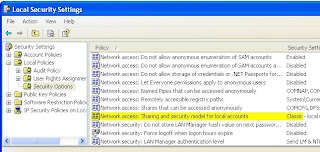
  • The Local Security Settings (in Control Panel: Administrative Tools: Local Security Policy) must be tweaked on Windows XP as following. Go to Security Settings: Security Options: Network Access: Sharing and security model for local accounts. This must be changed to Classic - local users authenticate as themselves.

Monday, February 02, 2009

ActiveDirectory Recovery Note

Since the time of Windows NT, I really disliked the Domain Controller architecture in Microsoft network. The part that I really did not like about it is that it basically required two dedicated machines to handle this, and we are not supposed to install anything else on it, for example SQL server (you can, and I strongly advise you against doing this. Some day you run into trouble and it will cost you several times over the cost of the hardware you thought you saved.) In addition they had the idea of Primary and Backup domain controllers with the notion of the backup controller a bit dubious since if you lost the primary, you probably lost the ability to get back the primary easily.

When Windows 2000 came out I was a bit excited to be told about the fact that the AD does not have the notion of the Primary and Backup. But soon enough that was not true, and in fact it got even more complicated.

This was now 2008, in my small office, I had a brilliant idea of hosting two AD servers on virtual machines since we don't really maintain any more than a few user names and such. Well, however, we've just lost one of the controllers during a VM migration completely, so I had to basically create another one from the remaining "backup" controllers.

This has caused a several hours of "wasted time," since I really don't want delve into this AD stuff. So if this happens again here is the note to myself. Things like a backup fail-over should be basically instantaneous and I expect there ought to be one-button thingy for basically an idiotic (by choice) user by me, but this not being like that does protect lot of jobs in the industry I would guess.

  • It seems to work better if you'd install the DNS first before adding the domain controller role.
  • Download the Windows Support Tool from the MS web site. This has two important tools . One is called NETDIAG and another is DCDIAG. These are command line tools and if you run them without any argument they will tell you in more gory details about what's wrong with your DNS and Domain Controller settings. Basically they run a series of tests and they will return either pass or fail. The idea is to fix things so that they will all Pass. For each Fail, type in the error message into Google (not Live Search) and you will find the answer article on how to fix things on Microsoft web site. (Message to MS - Please improve the search on your own product related information.) I would fix the DNS first.
  • Next tool you will need to use is NTDSUTIL program. You use this tool to basically transfer some of the critical roles that your lost domain controller had. The terminology you need to use to search is "Seize [blah blah] role" And you basically issue the Seize command to this tool. There are about 4 or 5 roles that you need to Seize, and one additional tricky thing is the "Infrastructure" role. This apparently should not be seized by the primary, so run the same tool on the secondary server and have it seize the "Infrastructure" role.
I think these would provide enough hints for you to get out of the lost PDC situation.

Monday, December 01, 2008

How To Nissan Key Fob Battery Replacement. 2005 Model year. Key-less system. What Battery To Buy

Symptom:

Want to replace a battery in Nissan Key Fob.

Battery:

The battery is CR2025, pretty standard. It is $15.00 at car dealership.

Replacement:

Pull the metal key out and there is a notch in the middle. With a small flat screw driver head apply a small pressure and then pull up the cover from the screw drive end while the pressure is being applied. It opens up quite easily.

Comment:

Sorry nothing to do with the regular IT article, but I just need to jot down the battery model if we need to do it again.


Tuesday, October 14, 2008

Mac QuickTime and QuickTime Web Plug-In Repair Note

This document is in the progress.

I am presently having QuickTime plug-in not playing certain type of video formats. It launches the QuickTime player from the browser both in Safari and Firefox but it does not play the actual movie. Presently below are the notes I am taking for what to do to fix the issue.

Check The Location of The QuickTime Plug-In

Plug-ins are located under /Library/Internet Plug-Ins There is the same directory under ~/Library/Internet Plug-Ins as well. On a fresh out of the box Macs neither locations contain anything. 

Check the QuickTime CODEC Installations

Extra and third party CODECS ones are usually installed at /Library/QuickTime

Popular CODECS and CODEC Utiity download sites:
Repair The Disk Permissions, Re-Install QuickTime

Some internet posts suggest that we need to preform the disk permission repair, reboot, re-install (the latest version of) QuickTime and re-repair the permission and reboot. To do the repair type in "Disk Utility" in Spotlight query filed (the magnifying glass stuff on top right of the Finder) then run the Disk Utility. 

There is a Fast Aid tab and in there you will find "Repair Disk Permissions" button. 

It takes about 3-4 minuets to run on a relatively new Mac (without much software installed) in my lab. 


Mobile Me iDisk Does Not Mount on Windows XP

Symptom:
I know I can use Map Network Drive feature on the Windows to mount iDisk using the Mobile Me credential, however when I type in my user name and password, it does not accept and it won't mount (map) my MobileMe iDisk volume (this is also true basically for most other WebDAV mounts.)

Solution:
You must explicitly click "Connect using a different user name." in the dialog box. There is some but a distinct difference between doing this first. Without doing this, you will still be asked for user name and password but that won't work even if you provide the correct user name and password of your Mobile Me account.


Note:
Mobile Me and iDisk is a great tool for me because I use Mac at home and XP at work and I often need to bring documenting work back and forth home and office. With remote desktop capabilities rampantly available, I no longer carry my laptop around. I just drag and drop files and continue to work at all locations.

Friday, October 10, 2008

QuickTime Plug-In Playback Jittery At Times

Symptom:

You have a page with a QuickTime plug-in using JavaScript with the AUTOPLAY and LOOP parameter set to TRUE and you are trying to view QuickTime movie embedded in the web browser on Safari (or any other browser). At times the movie plays back very jittery, but if you manually press the stop button and play button on the embedded QuickTime player, the jitteryness goes away completely (in my case we are sending AVI movies to it.)

You know there is nothing wrong with the movie file that was on the server because if you save the movie locally from the plug-in or make a copy of the file directly from the server and play it back it plays back normally.

Root Cause:

It appears that this problem occurs in the following manner:
  • The web server starts to send part of the movie
  • The QuickTime Plug-In starts to play any playable part
  • But the play head catches up with the download
  • The playing become jittery after that even even in the subsequent looping of the movie clip
Workaround Fix

In our case, we are not sending sound so we activated another QuickTime Plug-In parameter PLAYEVERYFRAME to TRUE. This may not completely fix your problem, however, at least by giving this a try, and the movie would play smoothly after it downloads all the frames then you know you have the exact problem as I had.

Comment

It appears that the reason this happens is that the plug-in will auto-adjust the play-back skip rate to preserve the audio playback sampling rate. Another way to try this is to set AUTOPLAY to off and try to play at different wait time (from almost no buffering to buffered full) and see you can duplicate this on your specific situation. This problem was worst when running on the Mac Safari on my MacBook Pro 17-in and lest on Microsoft Windows IE 7 under Windows XP. Also when the web server and video generation was on a very fast server this did not occur, but on a slower server this occurred more frequently.

Reference

Look in the latest Apple QuickTime Plug-In documentation (Google for) QTScripting_HTML.pdf for more information.

Time Took To Fix This

It took about 6 hours of time in front of the computer, visits to my customer site at night to qualify what is going on.